Nothing substantive and new shipped in the last 72 hours that we haven't already covered. The Vite 8.3.4 patch is from October 8, and Next.js 16.5 is still on canary builds. So here is a pro tip, and it's Next.js's turn. Everything below was checked against the current Fetching Data docs (version 16.4.0 at the time of writing).
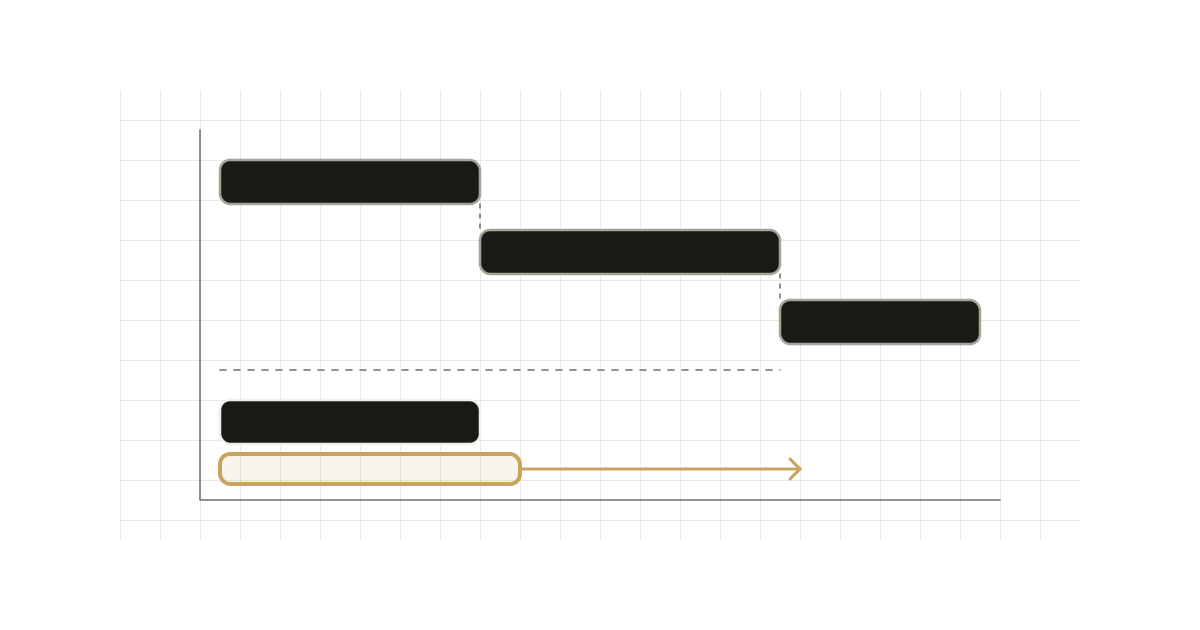
The tip: in a Server Component, two awaits in a row are a waterfall, even when the second request doesn't depend on the first. Layouts and pages render in parallel by default, but inside one component the order of your awaits decides the timing.
The problem
// app/artist/[username]/page.tsx
import { getArtist, getAlbums } from "@/app/lib/data";

export default async function Page({ params }: { params: Promise<{ username: string }> }) {
    const { username } = await params;
    const artist = await getArtist(username);
    const albums = await getAlbums(username); // starts only after getArtist resolves

    return <div>{artist.name}</div>;
}
The docs call this out directly: the requests are sequential, and getAlbums is blocked until getArtist resolves. Both only need username, so the total latency is the sum of the two when it could be the max. This reads naturally, passes review, and nothing in dev tells you it's slow against a fast local API.
Fix 1: initiate first, await together
Call the functions without await so both requests start immediately, then await them together:
export default async function Page({ params }: { params: Promise<{ username: string }> }) {
    const { username } = await params;

    // Initiate requests
    const artistData = getArtist(username);
    const albumsData = getAlbums(username);

    const [artist, albums] = await Promise.all([artistData, albumsData]);

    return (
        <>
            <h1>{artist.name}</h1>
            <Albums list={albums} />
        </>
    );
}
A fetch begins when it is called, not when it is awaited, which is the whole trick. One trade-off from the docs: if any request rejects, Promise.all fails the whole operation. When a partial page is acceptable, use Promise.allSettled and render what you got.
Fix 2: preload before blocking work
Sometimes you can't batch, because there's a genuinely blocking step in between, such as an availability check. The data request for the child can still start early. The docs describe a preload pattern: call the data function without await before the blocking work, then call the same function in the component that consumes it.
// app/item/[id]/item.tsx
async function getItem(id: string) {
    const res = await fetch(`https://api.example.com/items/${id}`);
    return res.json();
}

export const preload = (id: string) => {
    void getItem(id);
};

export default async function Item({ id }: { id: string }) {
    const item = await getItem(id);
    return <div>{item.name}</div>;
}
// app/item/[id]/page.tsx
import Item, { preload } from "./item";
import { checkIsAvailable } from "@/app/lib/data";

export default async function Page({ params }: { params: Promise<{ id: string }> }) {
    const { id } = await params;

    preload(id);
    const isAvailable = await checkIsAvailable(id);

    return isAvailable ? <Item id={id} /> : null;
}
The item request runs while checkIsAvailable() is in flight. If <Item> renders, its identical call reuses the request that preload() started. If it doesn't render, you spent one speculative request. That is the real cost of preloading, so use it when the happy path is the common one.
The docs recommend keeping preload next to the component that consumes the data, so the dependency is obvious when someone moves or deletes the component.
The dedupe requirement
Preloading only works if the second call returns the same in-flight work. The docs list three ways to guarantee that:
fetch: identical requests in a component tree are memoized automatically.- ORM or database clients: wrap the function in
React.cache. It is scoped to a single request, so there is no sharing between requests. - Cache Components: add
'use cache'to the function. If it reads request APIs such ascookies()orheaders(), the docs point to'use cache: private', where matching calls can reuse a result within one request in production without storing it across requests.
// app/lib/user.ts
import { cache } from "react";
import { db, eq, users } from "@/lib/db";

export const getUser = cache(async (id: string) => {
    return db.query.users.findFirst({ where: eq(users.id, id) });
});
Without one of these, preload(id) followed by getItem(id) is just two requests. You made things worse, not better.
Streaming is the other half
Parallel fetching shortens the critical path, but it doesn't remove it. The docs are explicit that a slow request blocks the route's rendering until it resolves, and they recommend <Suspense> closer to the runtime or uncached data access over relying on loading.js alone. A layout that reads uncached or runtime data does not fall back to a same-segment loading.js; it blocks navigation until the layout finishes. Cache Components catches that with a build-time error.
If the data is only needed on the client, the docs show a variant: start the promise in the Server Component, don't await it, and pass it to a Client Component that reads it with React's use, inside a <Suspense> boundary.
export default function Page() {
    // Don't await the data fetching function
    const posts = getPosts();

    return (
        <Suspense fallback={<div>Loading...</div>}>
            <Posts posts={posts} />
        </Suspense>
    );
}
When the sequential version is correct
Sequential fetching is the right shape when one request really needs the other's output. The docs' example is getArtistPlaylists(artist.id). There, don't fake parallelism. Instead make the first request fast or cacheable, and put the dependent part behind its own <Suspense> so the page shows the artist before the playlists arrive. The docs also note that the page still waits for the first request before displaying anything unless the whole page sits under a boundary such as loading.js.
Review checklist
- Two or more
awaits in a row in one component: do they share inputs only? Start both, thenPromise.all. - A blocking step before a child's fetch: add
preload(). - Non-
fetchdata access in a preload path: wrap it inReact.cache(or'use cache'), or you pay twice. - Failure tolerance: choose
Promise.allorPromise.allSettleddeliberately.